AI Video Translator · 32 Languages · Voice Clone

AI Video Translator: Your Voice, Any Language

Publish one video in 32 languages. DubTwin swaps only the voice and keeps your music, timing, and edit. Plans start at about $0.40 a minute, versus $50–$150 at a dubbing studio.

Free 10-second preview · No credit card · MP4 + SRT download

  1. Upload video
  2. Pick language & voice
  3. Translate
  4. Download
Free 10-second preview

Most AI dubbing tools flatten your soundtrack and hand you a robotic narrator. DubTwin transcribes your video, translates it for how people actually speak, re-voices each speaker, and mixes the new dialogue back over your original music. The translated version still feels like your video, ready for YouTube, TikTok, or your next market.

Still Sounds Like YouVoice Clone recreates each speaker in the new language, so your audience hears you, not a stock narrator.
Your Soundtrack StaysOnly the dialogue is replaced. Music and sound effects remain in the final MP4.
Pay by the SecondUsage is measured in seconds, never rounded up to the minute. You see the exact cost before you start.
Ready to PublishDownload the MP4 plus SRT and VTT captions for YouTube, TikTok, or any video editor.

Translate, dub, and export with DubTwin

32 target languages
Free 10-sec preview · No card
Voice Clone for every speaker
Background music preserved
Billed by the second
MP4, SRT, and WebVTT export
Hear It Yourself

Original vs. DubTwin: Real Clips, Real Output

Switch between the original and translated tracks and judge the voice, timing, and subtitles yourself. Clips are public-source interviews we processed with the current workflow, not customer case studies.

Public-source workflow test

Tony Benn interview · English to Spanish

2 timed segments · 1 speaker
Spanish translation:

"Hay formas de verlo. Una es decir: "Me gustaría entrar en la gestión de la sociedad,"

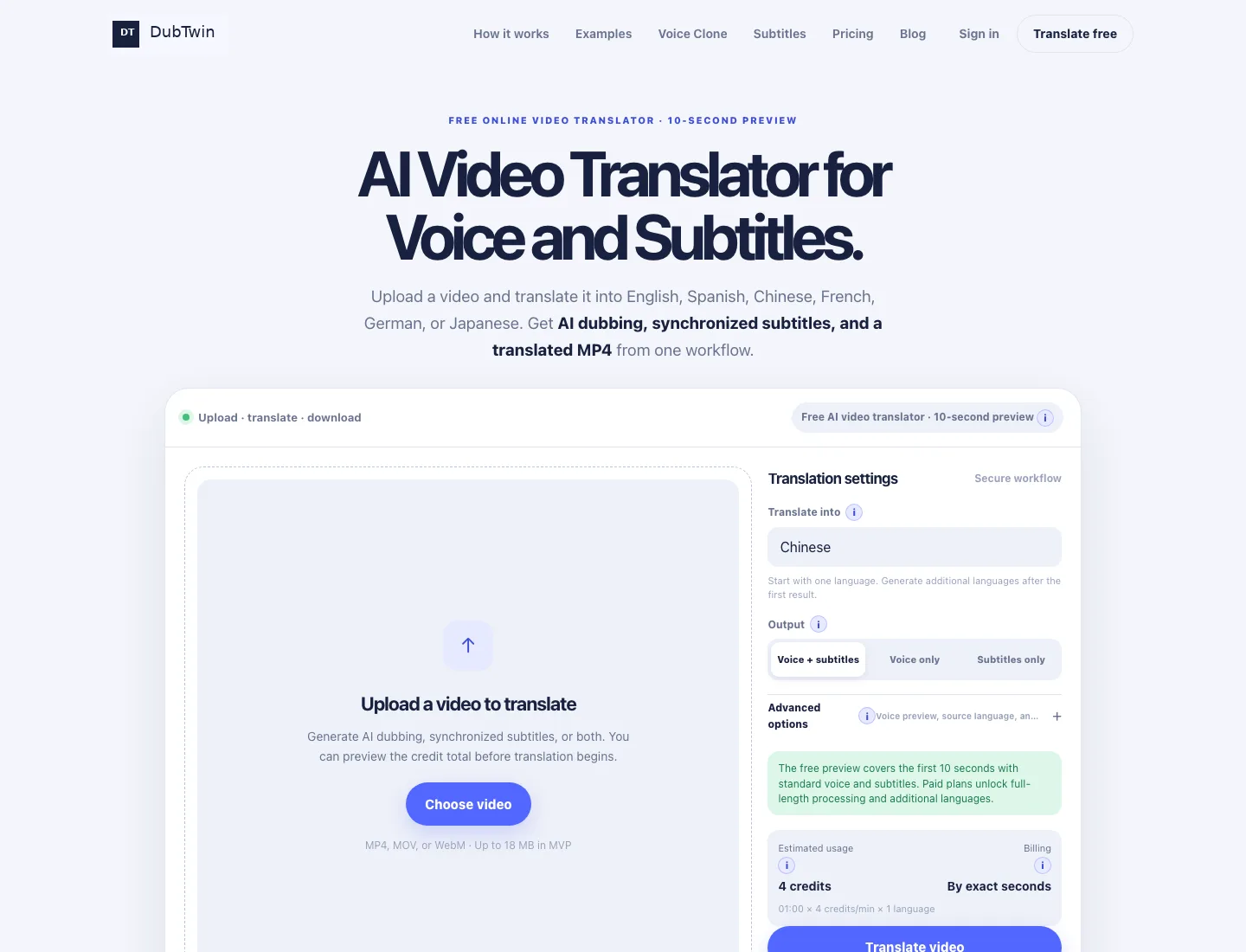
DubTwin AI video translator workspace showing source video upload, 32 target languages, and exact-second credit estimate
Upload, pick a language, keep your background audio, and preview 10 seconds free before you pay.
Why Use an AI Video Translator

Reach New Markets Without Studio Rates or Losing Your Sound.

Hiring voice actors costs $50–$150 per finished minute and takes weeks of back-and-forth. Subtitles alone are cheaper, but on a phone most viewers scroll past a video they have to read. DubTwin gives you a dubbed and captioned version in the new language, produced in a single upload for a fraction of the cost.

Localize a YouTube channel, a TikTok Shop ad, or an online course without booking talent or rebuilding your timeline.

✓One upload instead of weeks of production: Get a reviewable translated cut without scripts, casting, or re-editing.
✓Your soundtrack survives: Background music and sound effects stay in place under the new voice.
✓Publish anywhere: Leave with an MP4 plus SRT and VTT caption files for YouTube, TikTok, and any editor.
Who It’s For

Built for Videos That Already Work in One Language.

If a video performs in English, the same video can perform in Spanish, Portuguese, or Japanese. You already did the hard part. DubTwin makes the next language cheap enough to try.

Content Creators

Turn Your Best YouTube & TikTok Videos into New Channels

Republish your top-performing videos in Spanish, Portuguese, or Japanese and reach viewers your current language can’t. Voice Clone keeps it sounding like you, not a hired narrator.

One upload, as many language versions as you need
E-Commerce & Brands

TikTok Shop & Amazon Video Ads

Shoppers trust ads in their own language. Translate product demos, unboxings, and UGC-style creatives for new markets, then test them without reshooting a single frame.

Preview 10 seconds of your ad free before you commit
Education & Training

Online Courses, Webinars & Masterclasses

Give international students a spoken version of every lesson, plus synced captions for your LMS. Keep the instructor’s voice so the course still feels personal.

SRT and WebVTT files for any LMS or video player
SaaS & B2B

Product Demos & Onboarding Videos

Let one recorded demo serve every market. Sales and success teams can send walkthroughs in the buyer’s language, voiced by the same presenter.

Runs in the browser, nothing to install
What You Get

One Upload. Every File You Need to Publish in a New Language.

Not just a transcript. You leave with a finished dubbed video and caption files you can edit.

◌

Natural AI Dubbing in 32 Languages

Translated for how people speak, not how they write, then voiced with pacing and pauses that follow the original. No flat, robotic read.

▤

Captions That Are Already Synced

Download SRT and VTT files timed to the speech. Upload them straight to YouTube or drop them into Premiere Pro, Final Cut Pro, or DaVinci Resolve.

⌁

Your Voice, in Any Language

Voice Clone recreates each speaker’s tone and timbre in the new language, so founders, presenters, and creators stay recognizable. Included on every paid plan.

↗

Your Music Stays. Your Edit Stays.

Many AI dubbing tools mute your soundtrack. DubTwin replaces only the dialogue and mixes the new voice back over your original music and sound effects.

◷

Hear 10 Seconds Before You Pay

Sign in with your email and translate a 10-second preview with a standard voice and subtitles. It’s free and watermarked, and no card is needed. You’ll see the exact cost of the full video before anything is charged.

↺

One Video, Many Languages

Add another language to a finished project without re-uploading. Pro and Studio run several translations at the same time.

How It Works

How to Translate a Video in 3 Steps

No editing software, no transcript cleanup, no dragging captions around a timeline.

+
Step 1

Upload Your Video

Drag in an MP4, MOV, or WebM file up to 2 GB, including 1080p and 4K exports. No compression needed.

¿En serio? ¿Puedo verlo ahora?
Claro — aquí grabamos todo el video.✓
¡Qué genial! Se ve súper profesional.
Step 2

Pick a Language and a Voice

Choose from 32 languages, then a natural AI voice or Voice Clone to keep your own. Keep your background music with one switch.

Step 3

Preview, Then Download

Check the result, then download the dubbed MP4 with your original music, plus SRT and VTT captions ready for YouTube, TikTok, or your editor.

Translate My Video Free

Free 10-second preview · No credit card · Download included

Popular Language Pairs

Translate Spanish to English Video, English to Spanish, and More.

The language pairs creators and brands ask for most, each with natural AI voice, synced subtitles, and your original background audio.

Translate Spanish to English Video

Turn Spanish interviews, creator videos, and product reviews into fluent English speech. Grow beyond Latin America and Spain into the US, UK, and global English audience.

Spanish to EnglishSRT SubtitlesUS / UK Voice

Translate English Video to Spanish

Spanish has nearly 500 million native speakers. Translate your English tutorials, ads, and courses into natural Spanish and open one of the largest audiences online.

English to SpanishNatural CadenceLatAm & Iberian

Translate Any Video to English

Whether the original is in Japanese, Chinese, French, German, or Portuguese, get clear English speech with synced bilingual subtitles.

32 Source LanguagesGlobal EnglishSynced Timestamps

Translate Video to French & German

Reach the largest digital markets in Western Europe with French and German speech that sounds native, not machine-translated.

English to FrenchEnglish to GermanEuropean Markets

Translate Video to Japanese & Korean

Localize gaming showcases, animation breakdowns, and tech tutorials for East Asian audiences, with appropriately polite phrasing and clean voice tracks.

English to JapaneseEnglish to KoreanAsian Audiences

Translate Video to Portuguese & Italian

Reach Brazil’s fast-growing social audience and southern Europe. Turn product campaigns into Portuguese and Italian versions that keep the speaker’s inflection.

English to PortugueseEnglish to ItalianBrazilian Portuguese
Pricing

Pay for Minutes of Video. Not Studio Hours.

Every plan includes AI dubbing, synced subtitles, Voice Clone, and your original background music. Unused credits stay in your balance while your subscription is active. Cancel anytime.

Creator

For creators taking their best videos into a new language.

$12.67/mobilled annually
$152billed annually
12 months of credits · Save 33%
22.5 min / mo of dubbed video with subtitles
≈ $0.56 per minute · 90 credits / mo
  • Voice Clone for every speaker
  • Original background music kept
  • MP4, SRT, and VTT downloads
  • 1 saved voice profile
Most popular

Pro

For channels and brands publishing in several languages every week.

$32.67/mobilled annually
$392billed annually
12 months of credits · Save 33%
67.5 min / mo of dubbed video with subtitles
≈ $0.48 per minute · 270 credits / mo
  • Everything in Creator
  • Unlimited saved voice profiles
  • Add languages without re-uploading
  • 3 translations running at once

Studio

For teams and agencies localizing video at volume.

$72.67/mobilled annually
$872billed annually
12 months of credits · Save 33%
180 min / mo of dubbed video with subtitles
≈ $0.40 per minute · 720 credits / mo
  • Everything in Pro
  • Team workspace and asset library
  • Brand glossary and translation memory
  • 8 translations running at once

Just one project? Buy credits once.

No subscription. Credits stay valid for 12 months and work with dubbing, subtitles, and Voice Clone.

Small90 credits · ~22.5 min with voice + subtitles
$20
Medium150 credits · ~37.5 min with voice + subtitles
$30
Large360 credits · ~90 min with voice + subtitles
$60
Compare Your Options

DubTwin vs. Dubbing Studios vs. Caption-Only Tools.

What it costs, how long it takes, and what you actually get back.

Feature / MetricDubTwin AI Video TranslatorTraditional Dubbing AgenciesAuto-Caption Tools
Typical CostFrom about $0.40/min · Billed by the second · Cancel anytimeOften $50–$150 per finished minute, quoted per projectLow, but you only get text
Try Before You PayYes · Free 10-second preview with voice and subtitles (watermarked, no card)No, a paid quote is requiredUsually watermarked or text-only
Getting StartedUpload and start right away, with no booking or briefingScheduled production with casting and review roundsFast, but captions only
Translated VoiceNatural AI dubbing in 32 languagesHuman voice actorsNot supported
Background Music KeptYes, automaticallyRequires manual re-mixing ($$$)Not applicable
Original Speaker’s VoiceVoice Clone on every paid planSound-alike actors only ($$$)Not supported
Maximum Upload2 GB, including 4KCloud drive hand-offVaries by tool
Subtitle FilesSRT and VTT includedOften an extra transcription feeUsually included
Zero-Risk Start

Hear Your Own Video Translated Before You Spend a Cent.

No card, no sales call. Translate a 10-second preview, download it, and judge the voice, wording, and timing for yourself.

10 seconds, free

Pick any 10-second segment of your video and translate it with a standard AI voice and subtitles.

Judge it in your own tools

Download the preview as MP4, SRT, or WebVTT and check it wherever you edit or publish.

Know the price first

See the exact credit cost of your full video, calculated by the second, before any job starts.

Pick up where you left off

Your project stays in your workspace, so you can upgrade and continue without re-uploading.

Frequently Asked Questions

AI Video Translator FAQ.

The free preview, pricing, Voice Clone, background music, file formats, and subtitle exports.

Can I try the AI video translator for free?
Yes. Sign in with your email and translate a 10-second segment of your own video with a natural AI voice and synced subtitles. The preview is free and watermarked, and no credit card is needed. It is enough to judge pronunciation, pacing, and subtitle timing before you pay for the full video. Voice Clone and full-length processing unlock with any plan or credit pack.
How does an AI video translator work compared to standard subtitles?
Subtitles put translated text on screen while the original speech keeps playing, so viewers have to read. An AI video translator goes further: it transcribes the speech, translates it for natural spoken delivery, generates a new voice in the target language, and lines both the audio and captions up with the original timeline. DubTwin also keeps your background music and sound effects, so the result sounds like a local version of your video rather than a voiceover pasted on top.
Can I translate Spanish to English audio and keep the original timing?
Yes. Spanish to English is one of the most common pairs on DubTwin. The translator follows the pauses and sentence lengths of the original so the English voice fits each scene without overlapping or awkward gaps. You can download the dubbed MP4 together with editable SRT and WebVTT subtitle files.
How do I translate a video to English subtitles for free and export an SRT file?
Upload your MP4, MOV, or WebM file, choose English as the target language, and select Subtitles only. The 10-second free preview lets you check accuracy and timing. Once the full video is processed, download SRT and VTT files ready for YouTube, TikTok, Vimeo, Premiere Pro, or Final Cut Pro. Subtitles only is also the lowest-cost option at 0.8 credits per minute.
How do I translate a video with AI in 3 steps?
1) Upload your video (MP4, MOV, or WebM, up to 2 GB). 2) Pick one of 32 target languages and choose voice, subtitles, or both. 3) Preview the result and download the MP4, SRT, or VTT files. Uploading and setup take a couple of minutes, and processing time depends on the length of your video.
Can the AI video translator clone the original speaker’s voice?
Yes. Voice Clone, available on every paid plan and credit pack, builds a voice profile from the speaker in your video and uses it for the translated speech. Your audience hears a recognizable version of you in Spanish, Japanese, or any other supported language. This matters most for founders, course instructors, presenters, and creators whose voice is part of the brand. Only clone voices you own or have permission to use.
Does the translated video keep the original background music?
Yes. With background audio switched on, DubTwin separates the speech from the music, sound effects, and ambience, then mixes the new voice back over the original soundtrack. You get one finished MP4, with no need to re-score or re-mix.
How does DubTwin compare to Canva’s video translator or a dubbing agency?
Dubbing agencies use human voice actors and usually quote $50–$150 per finished minute, with scheduling and review rounds. General design platforms add translation as one feature among many. DubTwin is built only for video translation: it keeps your background music, can clone the original speaker, bills by the second, and gives you SRT and VTT files alongside the MP4.
What video formats and file sizes can I upload?
MP4, MOV (QuickTime), and WebM files up to 2 GB, uploaded straight from your browser. 1080p and 4K exports work without compressing them first. For the best result, upload the original export rather than a re-compressed download from social media.
How do plans and credits work?
Credits are spent by the second of video, never rounded up to a full minute. Voice plus subtitles uses 4 credits per minute, voice only 3.2, and subtitles only 0.8; Voice Clone adds a small per-minute charge. Creator includes about 22 minutes of dubbed video with subtitles each month, Pro about 67, and Studio 180. Annual billing costs the same as eight monthly payments for twelve months of credits, about 33% less. Unused credits stay in your balance while your subscription is active, one-time credit packs are available without a subscription, and you can cancel anytime.
Your Next Audience Speaks Another Language

Hear Your Video in a New Language, Free.

Drop in an MP4, MOV, or WebM file, pick a language, and get a 10-second translated preview with a natural AI voice and synced subtitles. No credit card required.

Translate My Video Free

Free 10-sec preview · Up to 2 GB uploads · 32 languages